
Before you read the answers
- Try each task before opening its answer.
- State the range, condition and unit in your explanation.
- Change an input and check that the formula follows it.
All examples use original synthetic data. Source row numbers and column letters are shown so you can reproduce the formulas.
1. Lock the shared discount
Calculate both net line values using the shared 10% discount.
USD and a decimal discount ratio.
| Row | A · Item | B · Units | C · Price USD | D · Shared discount |
|---|---|---|---|---|
| 2 | Notebook | 4 | 15 | 0.1 |
| 3 | Folder | 6 | 5 |
Worked solution and complete results
Notebook net USD · E2
=B2*C2*(1-$D$2)Result: 54
Folder net USD · E3
=B3*C3*(1-$D$2)Result: 27
A mistake to catch
Copying a formula with D2 as a relative reference moves the discount to blank D3.
Correction. Use $D$2 so both the column and row stay fixed. Quantities and prices retain relative references.
Read the result
The two net lines are USD 54 and USD 27. Explain which references should move when copied.
2. Total the right subset
Add only East orders that are Closed.
USD recorded revenue.
| Row | A · Region | B · Status | C · Revenue USD |
|---|---|---|---|
| 2 | East | Open | 110 |
| 3 | West | Closed | 160 |
| 4 | East | Closed | 230 |
| 5 | East | Closed | 70 |
Worked solution and complete results
East closed revenue · E2
=SUMIFS(C2:C5,A2:A5,"East",B2:B5,"Closed")Result: 300
A mistake to catch
Adding every East row returns USD 410 and includes an open order.
Correction. Use both criteria pairs. Keep all ranges the same height.
Read the result
USD 300 is closed East revenue. It is not all East revenue or the number of orders.
3. Keep a missing lookup visible
Look up service SV-8 in a unique two-row service table.
Text identifiers; XLOOKUP requires Microsoft 365 or Excel 2021+.
| Row | A · Code | B · Label |
|---|---|---|
| 2 | SV-2 | Setup |
| 3 | SV-6 | Support |
| Row | D · Request |
|---|---|
| 2 | SV-8 |
Worked solution and complete results
Requested service · E2
=XLOOKUP(D2,A2:A3,B2:B3,"Missing")Result: Missing
A mistake to catch
Returning zero for a missing label conceals the fact that the requested key is absent.
Correction. Provide an explicit Missing result and check key uniqueness before using first-match lookup.
Read the result
The source contains no SV-8. Ask for a corrected key or source rather than inventing a label.
4. Explain a grouped report
Summarize revenue by team using SUM. A pivot with Team as rows and Revenue as SUM produces the same two rows.
USD; two records per team, four records in total.
| Row | A · Team | B · Revenue USD |
|---|---|---|
| 2 | Oak | 80 |
| 3 | Pine | 125 |
| 4 | Oak | 45 |
| 5 | Pine | 55 |
Worked solution and complete results
Oak revenue · D2
=SUMIF(A2:A5,"Oak",B2:B5)Result: 125
Pine revenue · D3
=SUMIF(A2:A5,"Pine",B2:B5)Result: 180
A mistake to catch
Choosing COUNT instead of SUM returns two records per team, not USD revenue.
Correction. Name the question and value unit before selecting an aggregation. Compare the summary total of USD 305 with the source.
Read the result
Oak contributes USD 125 and Pine USD 180. A column chart can compare those amounts; it cannot supply missing business context.
Practise the skills in order
- Absolute references Read the guide, then open the actual lesson.
- SUMIFS Read the guide, then open the actual lesson.
- XLOOKUP Read the guide, then open the actual lesson.
- Pivot tables Read the guide, then open the actual lesson.
- Column and line charts Read the guide, then open the actual lesson.
The course offers focused formula and worksheet practice. It does not reproduce a proprietary employer assessment, proctor your identity or predict hiring results.
Practice the reference taskContinue in a downloadable workbook
Interview spreadsheet practice
Practise a mixed original work sample covering references, conditional totals, exact lookup and a short report.
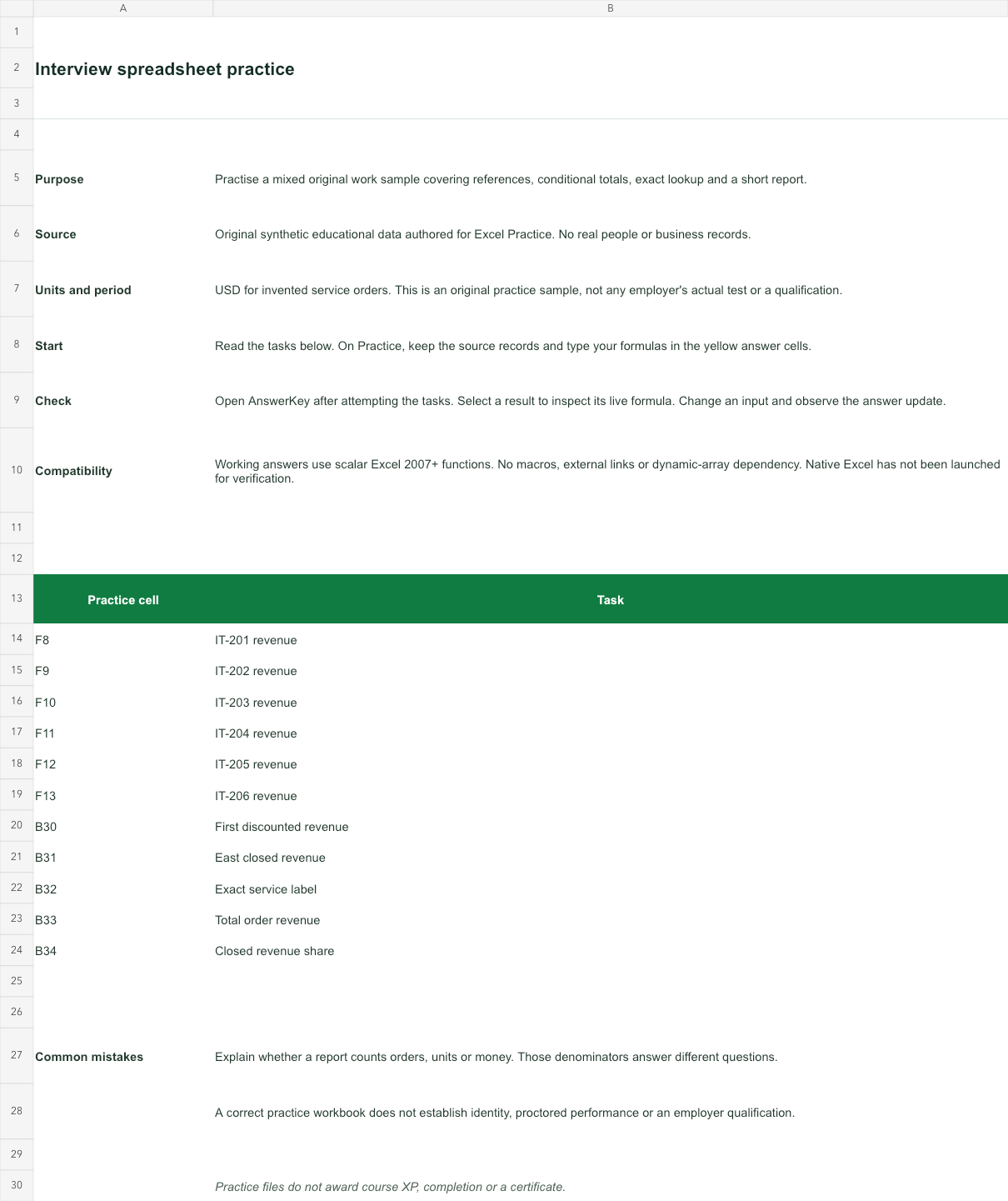
USD for invented service orders. This is an original practice sample, not any employer's actual test or a qualification.
Bank version 2026-11-02. Includes Instructions, Practice, AnswerKey; 11 live answer formulas. All source records are invented for education.
The download is an additional practice task. Its Instructions sheet identifies the source coordinates; this page’s illustrative example may use different records.
- Working answers use scalar Excel 2007+ functions. No macros, external links or dynamic-array dependency. Native Excel has not been launched for verification.