Formulas
Calculate percent of total in Excel with a fixed reference
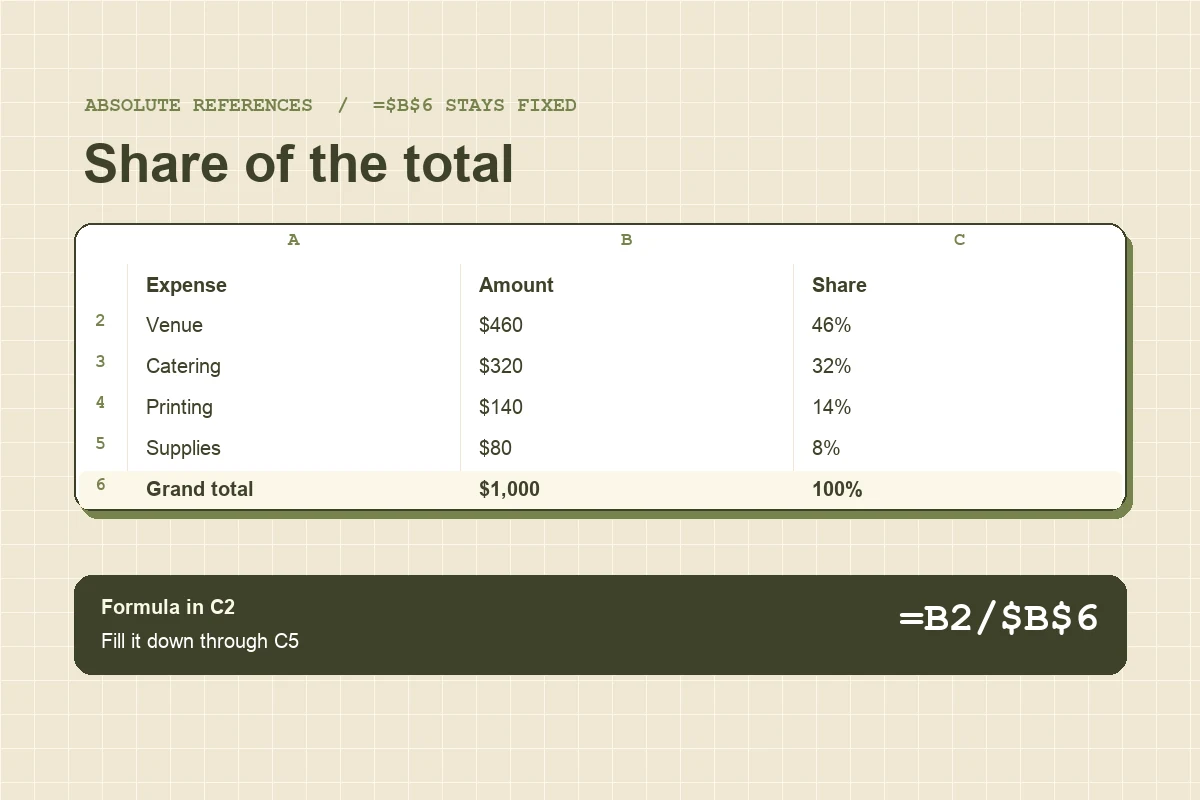
You have a $1,000 event budget and want to know what share goes to each expense. Divide each amount by the grand total, and fix that total with dollar signs before copying the formula down. The venue comes to 46% of the budget.

On this page
Build the expense list and confirm the total
Enter the category and amount headers in A1:B1, followed by the four expenses. Use numeric amounts. Put Grand total in A6 and enter =SUM(B2:B5) in B6. The result should be 1000. In C1, enter Share of total.
| Expense | Amount |
|---|---|
| Venue | 460 |
| Catering | 320 |
| Printing | 140 |
| Supplies | 80 |
Before writing the percentage formula, check which expenses belong in the denominator. If the decision is how to split this event budget, use the event total. If the same rows appear in a larger quarterly report, a share of the quarter requires the quarterly total instead. Give the column a name that identifies the total you chose.
See the worksheet diagram
Fix the denominator and fill down
Enter the following in C2, then copy it down through C5.
=B2/$B$6B2 is relative, so it changes to B3 in the next row. $B$6 is absolute, so it always points to the same total. You can type both dollar signs directly. On Excel for Windows, you can also select the reference in the formula bar and use F4 to cycle through reference types.
Select C2:C5 and use Percentage format from the Home tab. Excel displays the stored decimal 0.46 as 46%. Keep the formula as division. Multiplying by 100 in the formula and then applying Percentage format would show 4,600% for the venue.
| Expense | Copied formula | Displayed share |
|---|---|---|
| Venue | =B2/$B$6 | 46% |
| Catering | =B3/$B$6 | 32% |
| Printing | =B4/$B$6 | 14% |
| Supplies | =B5/$B$6 | 8% |
Check the copied formulas and the grand total
In C6, enter =SUM(C2:C5) and use Percentage format there too. For this sheet, the sum is 100%. If one row shows #DIV/0! after you fill down, inspect the denominator. A formula copied as =B3/B7 has slipped below the total into an empty cell.
Change Printing from 140 to 240. The total should rise to 1,100, and the venue share should fall to about 41.8% even though its amount stayed the same. That is a useful check that the shares refer to a live total. On other datasets, adding the displayed rounded percentages can differ slightly from 100%. Check the sum of the underlying cells.
Decide what a zero total should display
An unused budget or a set of entries that cancel out can have a total of zero. A percentage share requires a nonzero denominator. If your worksheet can start empty, use the following formula to leave the result blank until the denominator is nonzero. A blank is also a cue to check whether the dataset is complete.
=IF($B$6=0,"",B2/$B$6)The Share of total lesson builds other contribution rates on a consistent denominator. Use it to practice choosing what belongs in the total before you fix the reference.